API
Introduction
Description
PAYSTO API is a software complex for managing multichannel trading infrastructure.

PAYSTO API is fully compatible with Authorize.net Secure Hosted Payment Form API, which allows you to set up integration of any web resource without significant costs and in a short time.
Purpose
PAYSTO API allows you to automate payment acceptance and online order processing in Russia.
Terms and Concepts
| Term | Description |
|---|---|
| Recipient | The client for whose benefit funds are credited |
| Payer | The person making the payment |
| Shop | The Recipient's information system. For example, the Payer's cart on the Recipient's website and the Recipient's billing system. |
Simplified Payment Scheme
Solid lines – mandatory Dotted lines – optional.
Steps for Successful Payment
- Payment request;
- Verification of goods in the PAYSTO catalog;
- Payer redirection for payment;
- Payment status;
- Fiscal receipt generation;
- Payment status;
- Buyer return to Provider's website;
- Payment status request;
- Payment status.
Data Types
| Name | Description | Value Range |
|---|---|---|
| Integer | Integer | From 0 to 2147483647 |
| Long Integer | Long Integer | From 0 to 4294967296 |
| Monetary | Real, integer and fractional part separator is "." (dot), no digit separator, fractional part with accuracy to two decimal places. The presence of a dot and two digits after it is mandatory. For example, 10 must be written as 10.00, 10.123 must be written as 11.12 or 11.13 | from 0.01 to 1000000.00 |
| String | String. Cannot contain the symbol "=" (equals) and the symbol "&" (ampersand). | The length is defined separately for each parameter. |
| Datetime | Coordinated Universal Time (UTC). Presented in yyyymmddhhnn format where y – digits for the year, m – month, d – day of month, h – hour (hh – number from 0 to 23) n – minutes. For example, January 15, 2010 17:04 201001151704 | From 201001010000 to 205012312359 |
| MD5 | A string representing a 32-bit number in hexadecimal form and in lowercase (total 32 characters 0-9, A-F). |
Security
Requests
The IP of the request source is checked. Signature (mandatory).
PAYSTO Responses
Check the SSL certificate of the responding server.
Responding Server Addresses
The IP address of the responding server is specified in PAYSTO LC > Parameters
Payment Requests
Request for Invoice Payment
This step initiates the procedure for paying an invoice issued in the Shop.
| Address Element | Value |
|---|---|
| Protocol | https |
| Method | Post |
| Path | Information is provided in PAYSTO LC > Parameters |
| Encoding | UTF8 |
Parameters
| Name | Description | Type | Mandatory |
|---|---|---|---|
x_description | Payment comment | String | Yes |
x_login | Shop code | Integer | Yes |
x_amount | Amount to be paid | Monetary | Yes |
x_currency_code | Currency of the amount to be paid. Can take values USD or RUB | String | Yes |
x_cart_currency | Currency of the shop's cart. Values: USD, EUR or other short currency name. Passed when the cart currency is different from rubles (RUB) for display on payment pages (the amount and currency of debit are taken from x_amount and x_currency_code values). | String | No |
x_line_item | Cart content for payment. A detailed description of the field value is provided in the table below. | String | Yes |
x_email | Buyer's email address | String | No |
x_fp_sequence | Transaction number assigned by the shop. This can be an invoice number or any other random number. | Numeric | Yes |
x_fp_timestamp | UTC time in seconds, starting from January 1, 1970 | Numeric | Yes |
x_fp_hash | Signature generated using the HMAC-MD5 hashing algorithm with fields x*login, x_fp_sequence, x_fp_timestamp, x_amount and x_currency_code separated by ^ Signature Examples | Yes | |
x_invoice_num | Invoice number in the shop | Numeric | Yes |
x_first_name | Buyer's first name | String | No |
x_last_name | Buyer's last name | String | No |
x_address | Buyer's address | String | No |
x_city | Buyer's city | String | No |
x_state | Buyer's region/state | String | No |
x_country | Buyer's country | String | No |
x_ship_to_first_name | Shipping contact's first name | String | No |
x_ship_to_last_name | Shipping contact's last name | String | No |
x_phone | Contact phone | String | No |
x_fax | Contact fax | String | No |
x_cust_id | Buyer's ID in the shop | String | No |
x_ship_to_address | Shipping address | String | No |
x_ship_to_state | Shipping region/state | String | No |
x_ship_to_zip | Shipping address zip code | String | No |
x_ship_to_country | Shipping country | String | No |
x_relay_response | The string must have the value "TRUE" | String | Yes |
x_relay_url | Payment notification URL | String | Yes |
// Example string: "11111^789^67897654^10.50^USD"
// Example of signature generation:
Fingerprint = HMAC-MD5 ("11111^789^67897654^10.50^USD", "secret\*key")
The x_line_item field must contain one line from the user's shopping cart being paid for, consisting of several elements separated by the | delimiter. The number of fields passed must correspond to the number of items in the cart.
x_line_item field format
| Name | Description | Mandatory |
|---|---|---|
| Item ID | Item identifier. String up to 31 characters long | Yes |
| item name | Item name. String up to 31 characters long | Yes |
| item description | Item description. String up to 255 characters long. | Yes |
| item quantity | Quantity. Must be a positive number. | Yes |
| item price (unit cost) | Cost per unit of goods. Real, integer and fractional part separator is "." (dot), no digit separator, fractional part with accuracy to two decimal places. The presence of a dot and two digits after it is mandatory. For example, 10 must be written as 10.00, 10.123 must be written as 11.12 or 11.13 | Yes |
| item taxable | Is the item subject to VAT. Possible values: TRUE, FALSE, T, F, YES, NO, Y, N, 1, 0 | No |
Example of a cart being passed:
x_line_item=item1<|>golf balls<|><|>2<|>18.95<|>Y&
x_line_item=item2<|>golf bag<|>Wilson golf carry bag, red<|>1<|>39.99<|>Y&
x_line_item=item3<|>book<|>Golf for Dummies<|>1<|>21.99<|>Y&
Payment Details
This step notifies the Shop about the results of invoice payment.

For this request, the shop must check:
- The IP address from which the request originated;
- The invoice number;
- The payment amount;
- The signature.
Failure to perform these checks can seriously weaken protection against fraudsters.
| Address Element | Value |
|---|---|
| Protocol | https |
| Method | Post |
| Path | Specified in x_relay_url when sending a payment request |
| Encoding | UTF8 |
Parameters
| Name | Description | Type |
|---|---|---|
x*response_code | Payment result 1 – paid 2 – declined 3 – error | Integer |
x_trans_id | PAYSTO payment number | Long Integer |
x_invoice_num | Payment number in the shop | Integer |
x_MD5_Hash | Signature generated using the MD5 hashing algorithm with a secret key and fields x_login, x_trans_id, x_amount Example string "secret*key111119876543211.00" | MD5 |
x_amount | Payment amount | Monetary |
x_cust_id | Value is equal to the corresponding parameter in the payment request | String |
x_first_name | Value is equal to the corresponding parameter in the payment request | String |
x_last_name | Value is equal to the corresponding parameter in the payment request | String |
x_address | Value is equal to the corresponding parameter in the payment request | String |
x_city | Value is equal to the corresponding parameter in the payment request | String |
x_state | Value is equal to the corresponding parameter in the payment request | String |
x_zip | Value is equal to the corresponding parameter in the payment request | String |
x_country | Value is equal to the corresponding parameter in the payment request | String |
x_phone | Value is equal to the corresponding parameter in the payment request | String |
x_fax | Value is equal to the corresponding parameter in the payment request | String |
x_cust_id | Value is equal to the corresponding parameter in the payment request | String |
x_email | Value is equal to the corresponding parameter in the payment request | String |
x_ship_to_first_name | Value is equal to the corresponding parameter in the payment request | String |
x_ship_to_last_name | Value is equal to the corresponding parameter in the payment request | String |
x_ship_to_address | Value is equal to the corresponding parameter in the payment request | String |
x_ship_to_city | Value is equal to the corresponding parameter in the payment request | String |
x_ship_to_state | Value is equal to the corresponding parameter in the payment request | String |
x_ship_to_zip | Value is equal to the corresponding parameter in the payment request | String |
x_ship_to_country | Value is equal to the corresponding parameter in the payment request | String |
| Interpretation of HTTP CODE 200 response | Interpretation of no response, other HTTP CODE, Timeout |
|---|---|
| It is considered that the shop service received the notification. | It is considered that the shop service is unavailable and cannot fulfill its obligations to the buyer. Funds received from the buyer will be blocked. |
Returning the Buyer to the Shop
At this step, the Buyer returns to the Shop.
The data of this request passes through the Buyer's computer and can be forged by an unscrupulous Buyer. Therefore, it is not recommended to set the status for the issued invoice on Success url and Fail Url pages. Use Result Url for this purpose.
We recommend using the same page address for Success url and Fail Url, where based on the saved data when processing the Result url (or by re-querying the invoice status in PAYSTO), redirect the user to the final successful (unsuccessful) payment page.
It is important to understand that this step is performed from the Buyer's computer after some time has passed since the Buyer transitioned from the Shop to PAYSTO, so the Shop may need to authorize the Buyer to display private data.
| Address Element | Value |
|---|---|
| Protocol | https |
| Method | Post |
| Path | Specified during shop registration |
| Encoding | UTF8 |
Parameters match those described in Payment Details
Payment Information
For these requests, it is recommended to check the SSL certificate of the responding server to prevent DNS spoofing.
Statement for a Period
| Address Element | Value |
|---|---|
| Protocol | https |
| Method | Get |
| Path | https://paysto.com/api/Payment/GetList |
Parameters
| Name | Description | Type | Mandatory |
|---|---|---|---|
FROM | start of the period (default – beginning of the current day). | Datetime | Yes |
TO | end of the period (default – current moment). | Datetime | Yes |
PAYSTO_SHOP_ID | Shop ID | Integer | Yes |
PAYSTO_REQUEST_NO | Sequential (common for all request types) IS request counter, each subsequent value must be greater than the previous one. | Long Integer | No |
PAYSTO_MD5 | Signature of transmitted data. MD5 checksum. | MD5 | Yes |
Response Values
| HTTP CODE | Comment |
|---|---|
| 200 | CSV file in the format Datetime,PAYSTO_PAYMENT_ID,PAYSTO_INVOICE_ID,PAYSTO_SUM,accountSum,status, statusNote If there were no payments for the specified period – an empty file |
Column Description
| Name | Description | Type |
|---|---|---|
Datetime | Date and time of application registration. | Datetime |
PAYSTO_PAYMENT_ID | PAYSTO transaction number | Long Integer |
PAYSTO_INVOICE_ID | Transmitted invoice number in the shop. | String up to 50 characters |
PAYSTO_SUM | Application amount (the amount that was actually intended to be paid/already paid) | Monetary |
accountSum | Movement on Client Account. Positive – balance increase, negative – balance decrease. | Monetary |
status | Application status code. | Application Status |
statusNote | Comment on status. For example, if the status is RES_ERROR – then the error description. | String |
Response Values
| HTTP CODE | Comment |
|---|---|
| 403 | Security conditions violated. Check transmitted parameters and settings. |
| 404 | Shop not found |
Payment Details
| Address Element | Value |
|---|---|
| Protocol | https |
| Method | Get |
| Path | https://paysto.com/api/Payment/GetByInvoiceId |
Parameters
| Name | Description | Type | Mandatory |
|---|---|---|---|
PAYSTO_INVOICE_ID | Transmitted invoice number in the shop. | String up to 50 characters | Yes |
PAYSTO_SHOP_ID | Shop ID | Integer | Yes |
PAYSTO_REQUEST_NO | Sequential (common for all request types) IS request counter, each subsequent value must be greater than the previous one. | Long Integer | No |
PAYSTO_MD5 | Signature of transmitted data. MD5 checksum. | MD5 | Yes |
Response Values
| HTTP CODE | Comment |
|---|---|
| 200 | CSV file in the format Datetime,PAYSTO_PAYMENT_ID,PAYSTO_INVOICE_ID,PAYSTO_SUM,accountSum,status, statusNote |
Column Description
| Name | Description | Type |
|---|---|---|
Datetime | Date and time of application registration. | Datetime |
PAYSTO_PAYMENT_ID | PAYSTO transaction number | Long Integer |
PAYSTO_INVOICE_ID | Transmitted invoice number in the shop. | String up to 50 characters |
PAYSTO_SUM | Application amount (the amount that was actually intended to be paid/already paid) | Monetary |
accountSum | Movement on Client Account. Positive – balance increase, negative – balance decrease. | Monetary |
status | Application status code. | Application Status |
statusNote | Comment on status. For example, if the status is RES_ERROR – then the error description. | String |
Response Values
| HTTP CODE | Comment |
|---|---|
| 403 | Security conditions violated. Check transmitted parameters and settings. |
| 404 | No invoice with this number found for this shop |
Account Status
For these requests, it is recommended to check the SSL certificate of the responding server to prevent DNS spoofing.
Balance Check
| Address Element | Value |
|---|---|
| Protocol | https |
| Method | Get / Post (recommended) |
| Path | https://paysto.com/api/Common/Balance |
Parameters
| Name | Description | Type | Mandatory |
|---|---|---|---|
PAYSTO_SHOP_ID | Shop ID, issued upon registration. | Integer | Yes |
PAYSTO_REQUEST_NO | Sequential (common for all request types) request number, each subsequent value must be greater than the previous one. | Long Integer | No |
PAYSTO_MD5 | Signature of transmitted data. MD5 checksum. | MD5 | Yes |
| Response | Description | Type |
|---|---|---|
| HTTP CODE 200 | Scalar value. Available balance. | Monetary |
| HTTP CODE 403 | Security conditions violated. Check transmitted parameters and settings. | |
| HTTP CODE 404 | Shop not found |
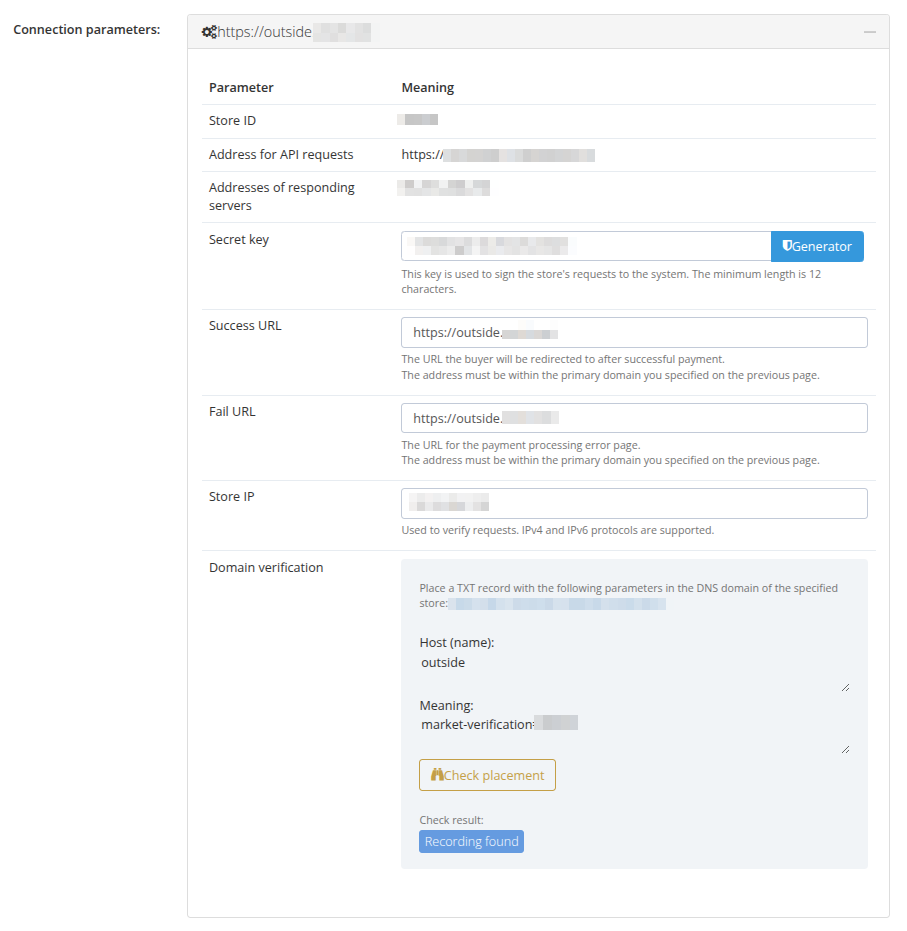
Appendix. Connection Parameters
Data obtained from the Personal Account interface (registration required):
- Shop ID;
- Address for API requests;
- Responding server address;
- Secret key (set by the user during connection);