

Domain Ownership Verification for Paysto
Connecting your web resource to the Paysto infrastructure requires mandatory domain ownership verification. This process ensures the security and verification of your business.

Without domain ownership verification, your application for connecting your resource will not be considered by Paysto's security service.
How it works
Every domain (e.g., yourwebsite.ru) has a set of DNS records that determine how to find your site and where to direct emails. To verify ownership, Paysto uses a special TXT record.
After filling out the application form for connecting a web resource in Paysto, you will receive a unique verification code. This code must be placed in your domain's DNS records. As soon as this record is published, Paysto will be able to verify that the domain belongs to you and will proceed with considering your application.

Placing a TXT record is a standard procedure that does not alter the operation or disrupt the functionality of your web resource.
Preparation for Verification
Before you begin, make sure you have:
- Login and password to access the control panel of your domain registrar (or DNS record holder).

Paysto cannot access your control panel. If you need help accessing your registrar, contact their support service.
- Registrar information: If you don't know your registrar, you can get information from open whois sources, for example:
Step-by-step guide for placing a TXT record
For the fastest possible completion of the procedure, we recommend opening two browser tabs: one with the Paysto Personal Account (on the web resource connection request page) and the second with your domain's control panel.
1. Find the DNS record management section
Log in to your account on your domain registrar's website.
Go to the domain management page.
Select the domain you want to verify and find the DNS record management section.
This page is usually called:
- "DNS settings" (DNS settings) or "DNS management" (DNS management)
- "Advanced settings" (Advanced settings)
- "Name server management" (Name server management)
- "Control panel" (Control panel)
If you cannot find the DNS record management section, contact your domain registrar's support service.
2. Obtain TXT record data in Paysto
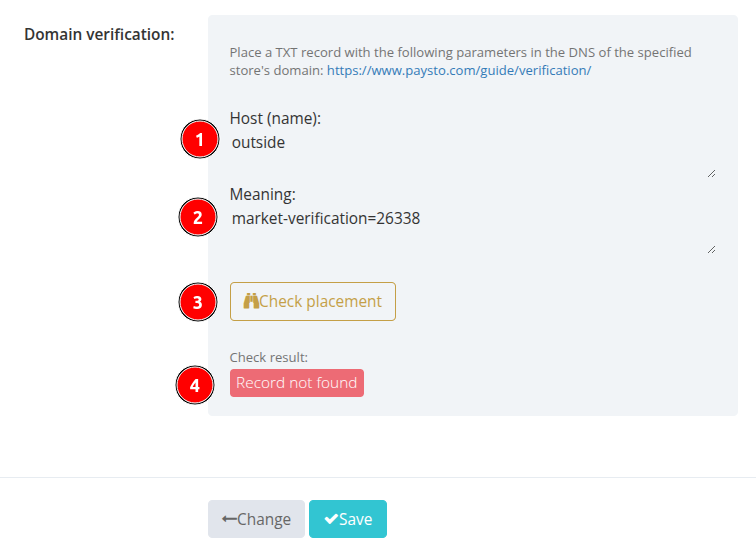
In your Paysto Personal Account, on the web resource connection request form, find the "Domain Verification" block. Here you will find the Host and Value for your TXT record:
3. Create a TXT record on the domain registrar's website
Return to the domain registrar's website and create a new record of type TXT:
Field
Name(Name): May also be calledHost,Hostname, orAlias. Enter the@symbol, specify the domain name, or subdomain (depending on your registrar's requirements and what is indicated in theHostfield (1) in Paysto).Field
Value(Value): May also be calledData,Answer, orDestination. Insert the verification code value obtained from Paysto here (Value(2) in the screenshot).Save the TXT record.
DNS information updates take from a few seconds to 10 minutes, depending on your registrar's settings. For exact information, check with them.
4. Check TXT record placement in Paysto
Return to the browser tab with the connection request form in Paysto and click the Check Placement (3) button:
Upon successful verification, the color and value of status 4 will change to "Record found":
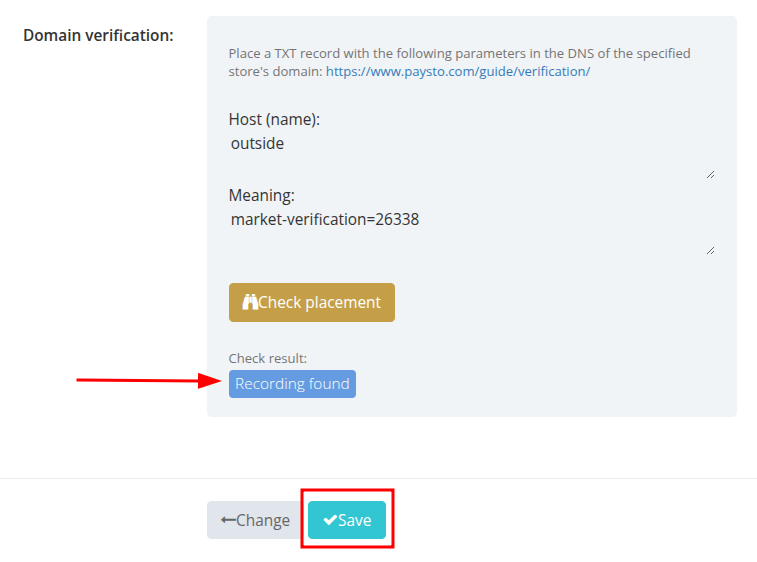
If the Paysto system does not detect the TXT record, check the placement for correctness and try again in 10 minutes. If the problem persists, contact your domain registrar or DNS record holder.
5. Complete the connection
Click the Save button to complete the domain verification process and submit your web resource for moderation in Paysto.