

Registration in Paysto
Before you can start using all the features of Paysto, you need to register a Personal Account.

Paysto services may be unavailable in some countries.
Make sure your web resource complies with Paysto's requirements and does not fall under the list of prohibited goods and services.
Also, please note that Paysto's infrastructure is not intended for offline trading.
What you will need for registration
To create a Paysto Personal Account, you will need to provide the following information:
E-mail address — it will be used as the main login and channel for all notifications and confirmations.

Attention: E-mail is the only way to manage your account in the Paysto panel. Loss of access to the specified email will result in the loss of the ability to withdraw funds and manage the account. Use a reliable and permanent email address; avoid disposable or temporary services.
- Important: Paysto does not separate production and test accounts. You can create any number of accounts, each linked to a unique email. If you need multiple accounts, create a separate email for each.
Mobile phone number or Telegram account — used for initial user verification.
- Verification is carried out by receiving an SMS code on the specified mobile phone or by confirmation in the Telegram application.
The mobile phone number/Telegram account is used only for initial verification during registration. All subsequent confirmations of actions in the system (e.g., withdrawing funds or changing data) will be sent to your primary E-mail.
Registration process
To register, follow the link: https://account.paysto.com/Account/Register.
The registration form will open before you:
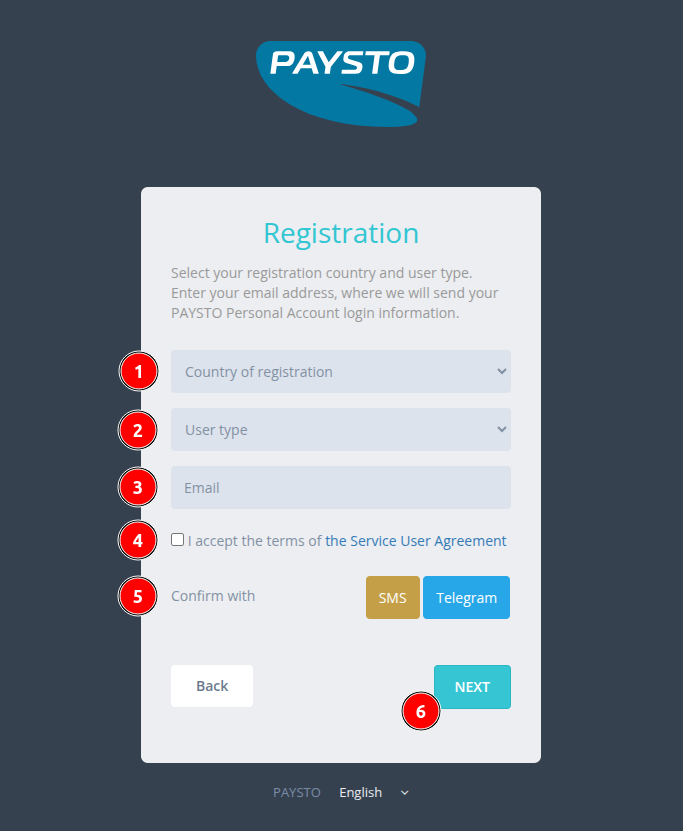
Order of filling out the form:
- Select your country of registration from the dropdown list. If your country is not on the list, select
Other. - Select the user type. For individual entrepreneurs (IE),
Legal entityshould be selected. - Enter your e-mail address.
- Carefully read Paysto's terms of use and check the box, confirming your agreement.
- Complete verification using one of the proposed methods: with an SMS code to your mobile phone or through authorization in Telegram.
- Click the
Nextbutton. The button will become active after the form is fully completed and verification is passed.
Completing registration
Upon successful registration, you will see a confirmation page:
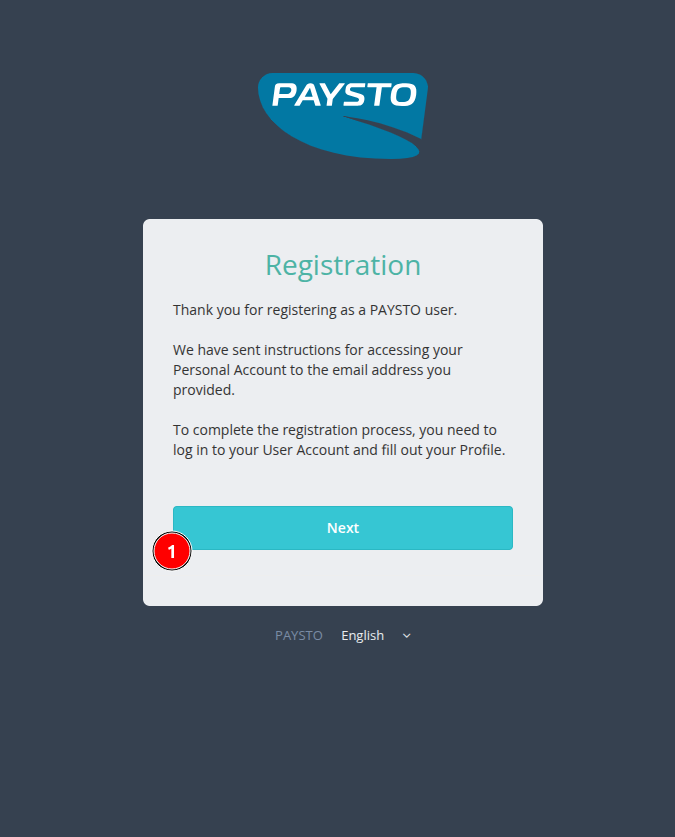
An email containing your password and a direct link to the Account Login page will be instantly sent to your e-mail.

The process of creating a Personal Account is fully automated. The message with the password is sent instantly, but sometimes it may end up in the SPAM folder. Please check this folder if the email does not arrive promptly.
What's next? After receiving your password, you can log in to your Personal Account and proceed to fill out your profile and add your web resource.